I Ditched My Keyboard for an Xbox Controller. Work Has Never Been More Fun.
Claude, wireless headphones, and an Xbox controller. More done and more fun. Here’s my setup.

I’m not at my desk. I’m walking laps around my office, headset on, an Xbox controller in my hand, talking to Claude. I haven’t touched my keyboard in an hour, and I’ve never been more productive.
A mechanic friend helped me understand why this is. I wanted to try my hand at adding a cold air intake to my VW Golf (they sound awesome). He said I’d likely want a new exhaust too. More air coming in needs somewhere to go. Speed up one part of a system, and the next slowest part becomes the bottleneck.
For years, my bottleneck was a pencil (yes, I’m that old) and then a keyboard. My brain runs hot and my hands never quite kept up. So I ditched the keyboard. Now I get more done, and I have more fun doing it. If that sounds familiar, this is for you.
One disclaimer
This is one person’s setup, not a study. I work from home, so nobody watches me pace the kitchen and talk to my laptop. If you work in an open office, you might want a door. Like many AI-native business builders, I enjoy wearing a lot of hats. Your specific mileage may vary.
The setup
I run a Mac. Windows works too, with a different mapping app (more on that below).
The gear
- Any Bluetooth-enabled Xbox controller.
- Wireless headphones with a good mic. Bose 700s are my personal favourite, but any solid pair works. The mic matters more than the brand: a bad mic means bad voice input, and bad voice input slows down the whole thing.
The apps
- Claude desktop.
- Controlly ($3.99 on the Mac App Store). It maps controller buttons to keyboard shortcuts, which is the part that turns a game controller into a work tool. Controlly is Mac only. On Windows, JoyToKey does the same job (reWASD is another option).
The mapping
Map each button to something you actually do, so the move you make a hundred times a day sits under a thumb.
Talk, then send. The right trigger toggles Claude’s own voice input. Pull it once to start talking, pull it again to stop. Then tap B to send. That’s the whole loop, no keyboard: trigger, talk, trigger, B. It toggles instead of hold-to-talk, so you can pause and think without holding a button down. Skip Mac’s built-in dictation. Claude’s voice input is cleaner, and the trigger fires it.
Read the long stuff. Claude’s answers run long, so scrolling is the move you make most, and the right stick handles it. I bump the text size up at the start of a session too, so it’s easy to read from across the room while I pace.
Three Claudes, three kinds of work. Each Claude surface gets its own bumper or button, matched to the work I do there. Left bumper is Chat, for writing, research, and strategy. The View button is Cowork, for desktop jobs with no API, like putting in a grocery order. Right bumper is Claude Code, for dev work.
Spin up sessions without sitting down. I start fresh sessions all day. The Menu button opens Claude Code’s command menu, and from there the right bumper opens a new session. The D-pad moves up and down the list of recent ones.
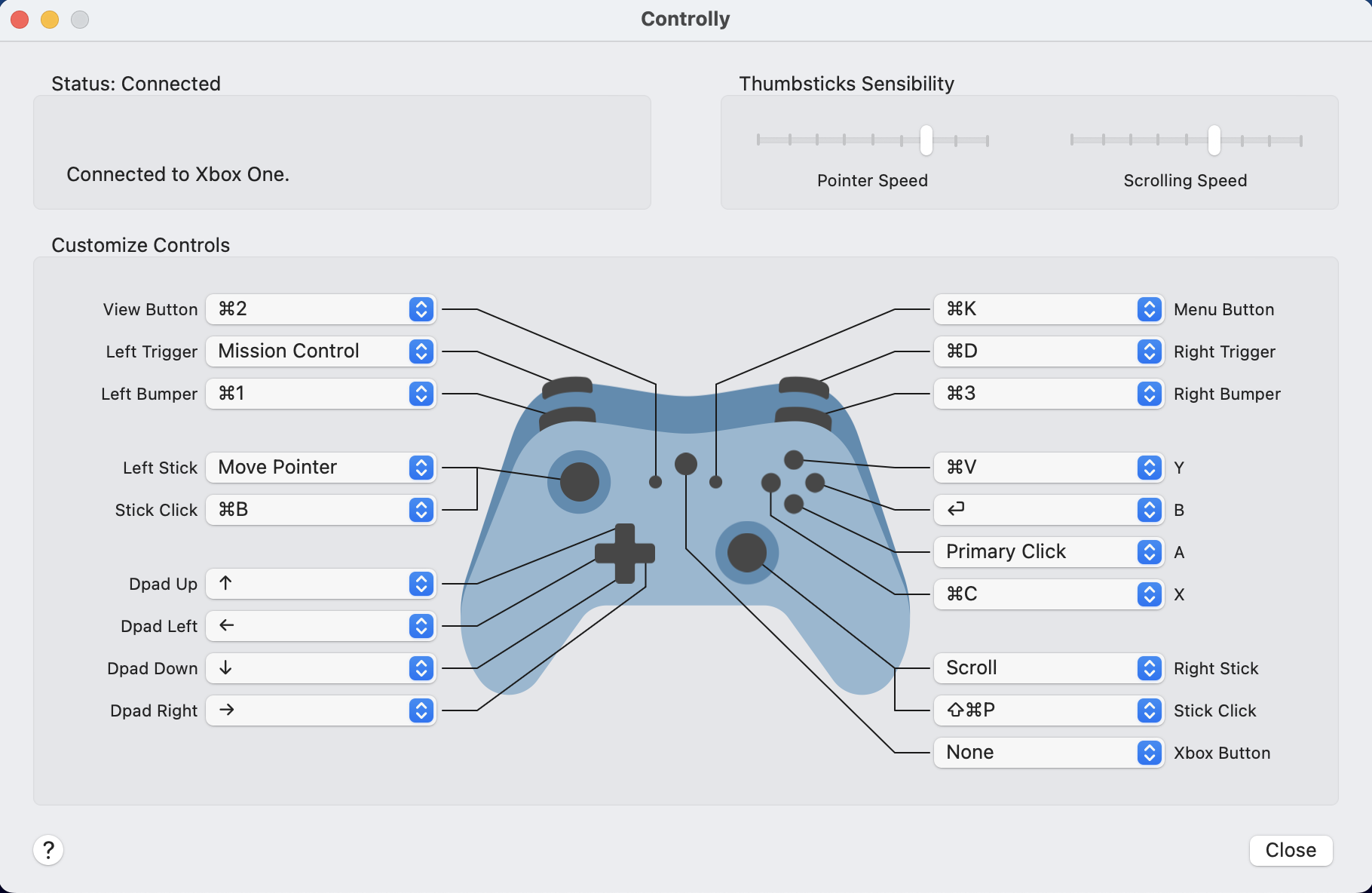
My full button map
| Controller | Shortcut | What it does |
|---|---|---|
| Left Bumper | ⌘1 | Claude Chat |
| View Button | ⌘2 | Cowork |
| Right Bumper | ⌘3 | Claude Code |
| Menu Button | ⌘K | Command menu (recent and new sessions) |
| Right Trigger | ⌘D | Toggle Claude’s voice input |
| B | Return | Send |
| A | Primary Click | Click |
| Y | ⌘V | Paste |
| X | ⌘C | Copy |
| Right Stick | Scroll | Scroll the page |
| Left Stick | Move Pointer | Move the cursor |
| Left Stick Click | ⌘B | Collapse Claude sidebar |
| Left Trigger | Mission Control | Switch desktops |
| D-pad | Arrow keys | Menu navigation |
Companion skill: forthcoming. Drop it into your Claude desktop and it’ll walk you through setup end to end.
Why it works
Three things make this more than a gimmick.
Voice is faster than your hands. A 2017 Stanford study found talking was three times faster than typing on a phone, with twenty percent fewer errors.
Walking makes you think better. A 2014 Stanford study found people came up with more ideas on their feet than in a chair, inside or out.
Staying on your feet keeps your energy steady. Breaking up sitting with short, frequent walks lowers your blood sugar more than one long workout does (Dunstan, Diabetes Care, 2012). Steady blood sugar means steady energy, and no afternoon crash. Your brain is about 2% of your body but burns around 20% of its fuel, so keeping it topped up matters.
Where people get stuck
The standing-desk trap. Standing while you type is still typing. The keyboard is still the slow part. Don’t fix the wrong half. Drop the keyboard and move.
A weak mic. Laptop mics are fine up close. Across the room, they’re rough. Use the headset mic.
Too many buttons. Start with the core loop: talk, send, scroll, click. Add the rest once those are muscle memory. A controller with thirty jobs is one you won’t use.
Permissions. Controlly needs Accessibility and Input Monitoring access in System Settings, like any app that drives your keyboard and mouse. Grant it once, or the buttons do nothing.
That’s the whole setup. It’s not a fit for every type of task, but adding it to my toolbox has been a game changer. Enjoy.
Follow along.
We share how we build an AI-native business, out in the open. Follow Splendid Engines on LinkedIn for more.
Follow us on LinkedIn